1. 功能分类
Area Scan / Line Scan
- Area Scan - 最常见的相机
- Line Scan - 打印机里的扫描仪
Color / Monochrome 彩色 / 黑白
CMOS / CCD
- CMOS - Complementary Metal Oxide Semiconductor
- CCD - Charged Coupled Device
目前 CMOS 的综合性能会更好一些
Global Shutter 全局快门 / Rolling Shutter 卷帘快门
- Global Shutter - Capture entire frame at once
- Rolling Shutter - Capture image line by line
由于卷帘快门的抓拍有顺序,因此会出现如下状况
- 与抓拍物的相对运动会导致抖动和变形
- 抓拍闪光等瞬时效果时,不一定能拍全,此时(快门速度 < 闪光消失速度)
全局快门相机更适合运动摄影,但是呢...更贵,得爆金币(XP
Resolution 分辨率
320p, 640p, 720p, 1080p, 1440p, 2160p, 4320p, ...
Frame Rate 帧率
15Hz / 30Hz / 60Hz...
Focal Length 焦距
Fixed 固定焦距 / Auto-Focus 自动对焦
Connection Interface
USB 3.0 / GigE ...
2. Color Space
2.1 RGB[A]
一般的彩图是以 RGB(Red-Green-Blue)格式储存的
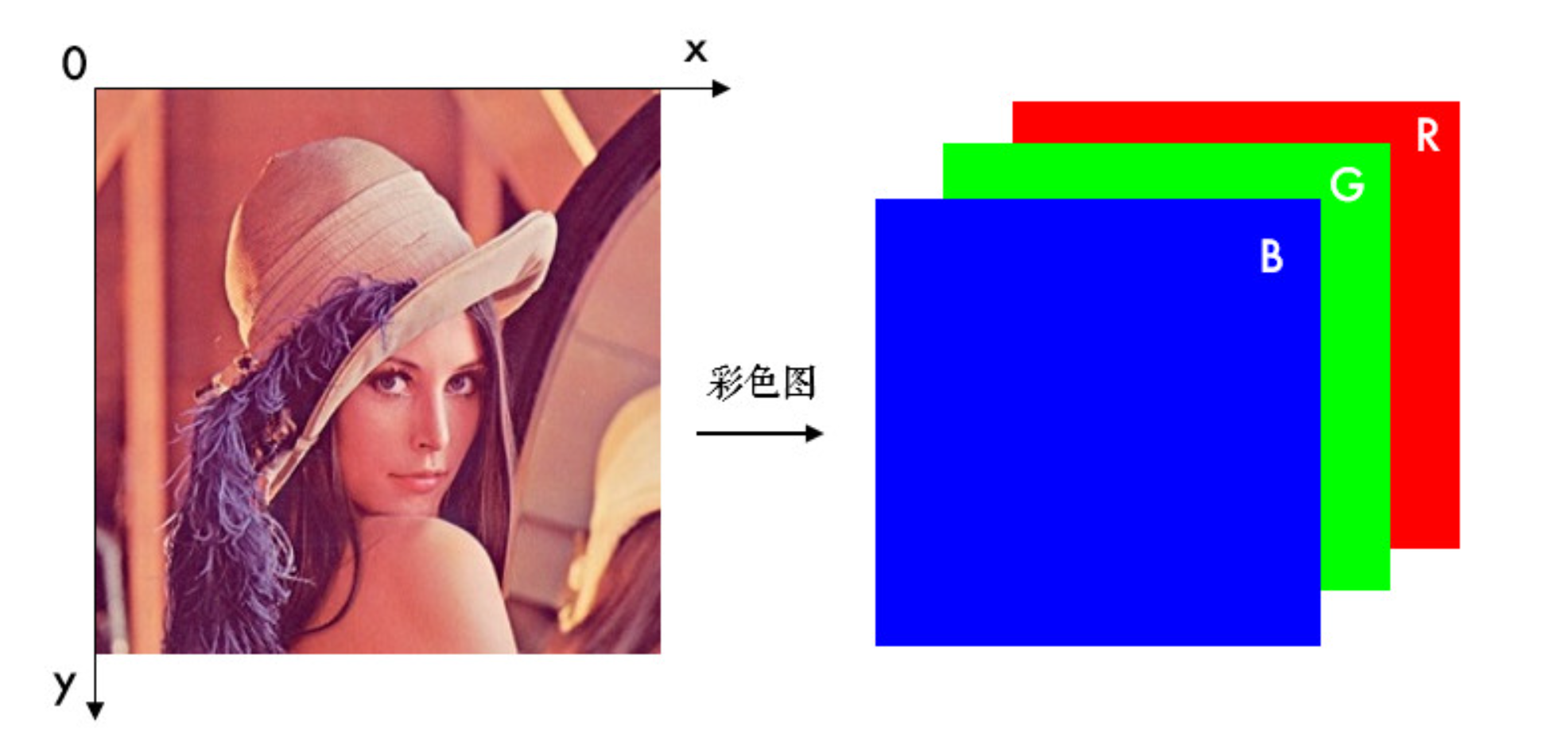
一般R, G, B channel values在不同图片类型下的取值范围:
CV_8U		8bit unsigned integer		0 - 255
          CV_16U		16bit unsigned integer		0 - 65535
          CV_32F		32bit floating point		0 - 1
Alpha Channel是除了RGB以外的第四通道——“非彩色通道”,能读取透明度
2.2 Gray / Greyscale 灰度图
一般只有一个 Channel
RGB转灰度的常用公式为
2.3 HSV
Hue - Saturation - Value / 色相 - 饱和度 - 明度
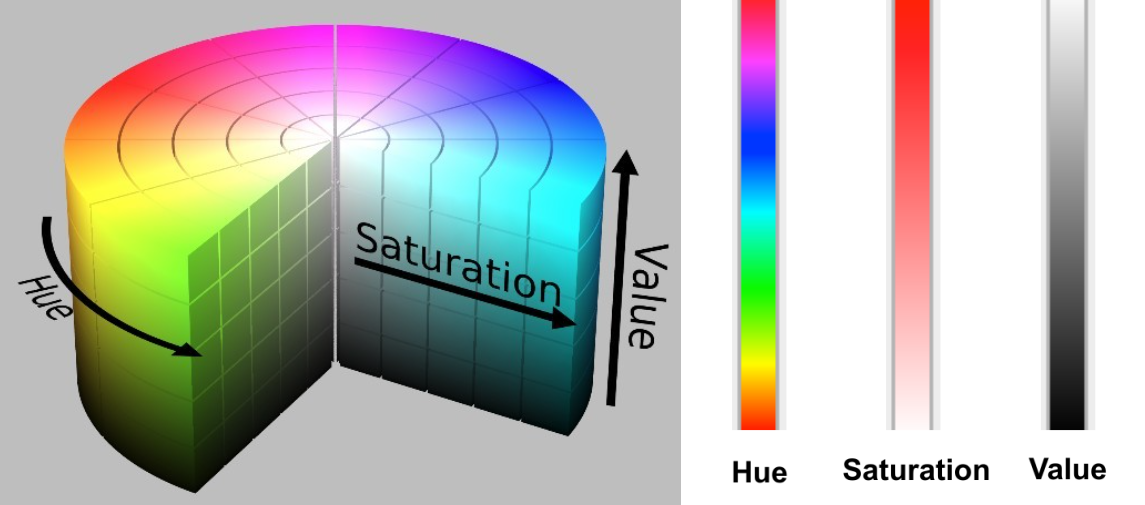
- Hue 色相 - Base Pigment
- Saturation 饱和度 - Depth of Pigment
- Value 明度 - Darkness of Pigment
HSV - RGB conversion is mathematically lossless
3. Rigid Body Motion
基于欧拉角的刚体运动描述方式
3.1 2D Rotation
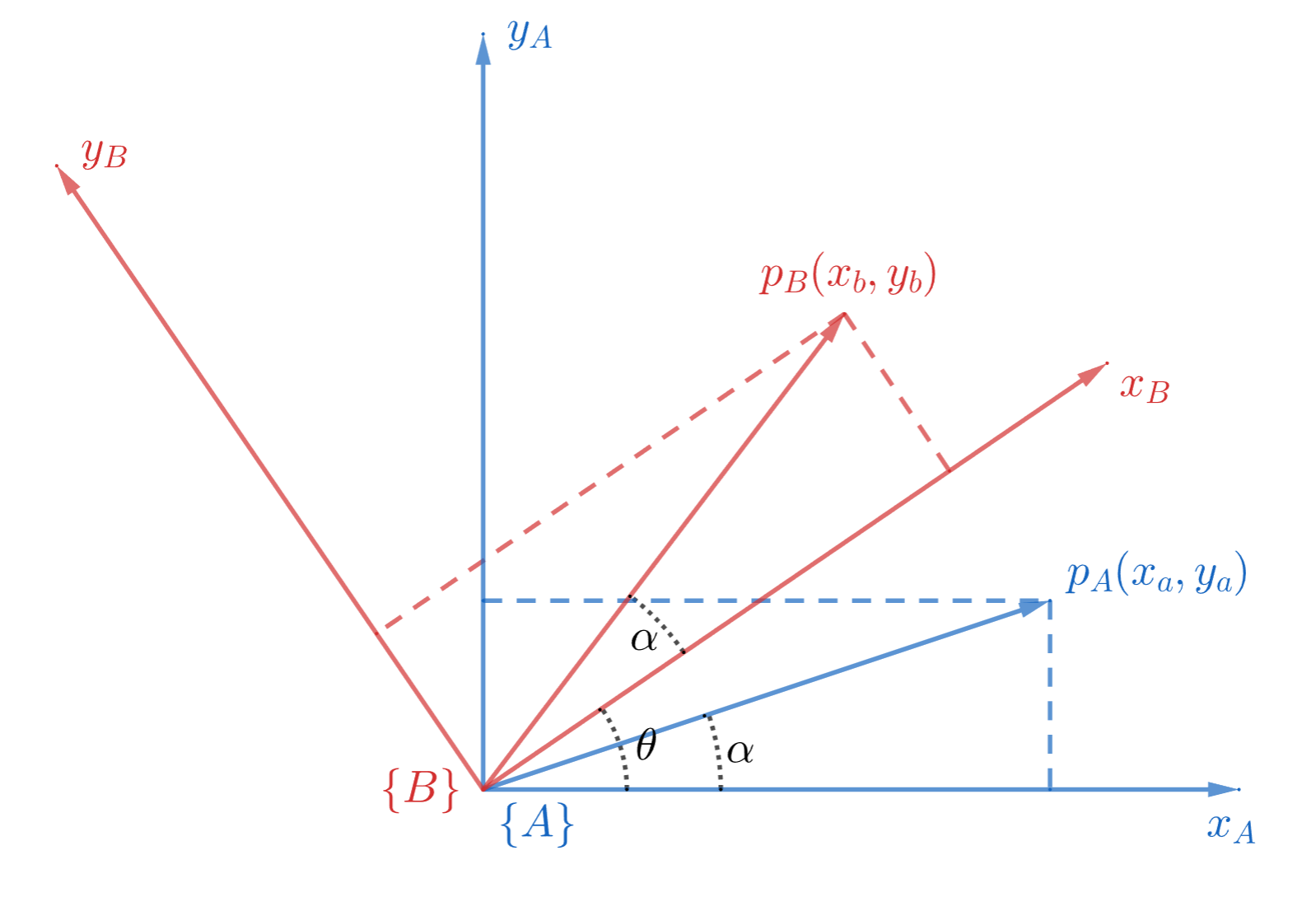
现在将它旋转
从上图其实可以看出
,然并卵,这信息不加工没有任何用处
How to express
Define
coordinates of in coordinate of expressed in coordinate of expressed in
然后就能得到如下关系式
证明?嘿嘿嘿...Trivial !
通用表达方式
[General Case]
moving from to 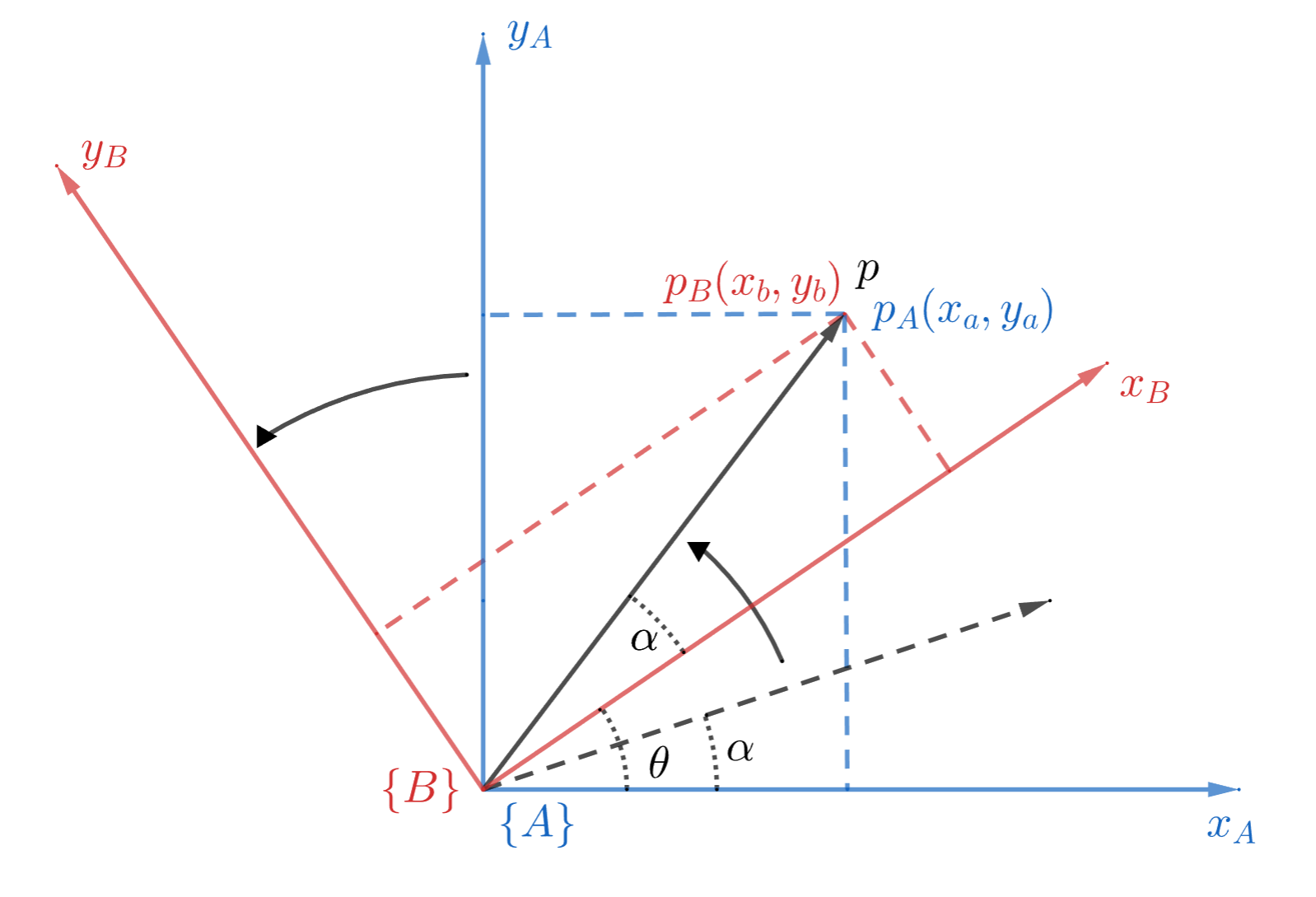
上图中,点
从 Frame (以黑色虚线标注)变换到 Frame (以黑色实线标注),此时有 coordinates of in coordinates of in coordinates of in coordinates of in
Important Properties
3.2 2D Translation
这个甚至都不需要画图表示了,
3.3 Homogeneous Coordinates
Homogeneous Coordinates 齐次坐标,这到底是什么捏
旋转 & 平移 Review
3.1 和 3.2 的流程如果都用最基本的矩阵描述,那就是
此处更换一下notation,用更加通用的
来表示被变换点,用 来表示 Translation 2D Rotation
2D Translation
where
Coordinates of in Position of in Position of point in Position of point in
暴力 V.S. 优雅 运动描述
两个运动,两个公式;那如果只用一个公式,一次性表达 Rotation + Translation 呢?
如果你觉得还好,那大可以试试多做几个运动,然后依然只用一个公式表达...
再套几层,动作顺序shuffle一下,这样还能分辨的出哪个运动属于哪个步骤就有鬼了...
现在我告诉阁下,有某种方式能用一条统一且简洁的 Matrix Train 来描述运动,那阁下该如何应对
Homogeneous Coordinates
实现上述简洁方法的方式就是变换成 Homogeneous Coordinates 齐次坐标
换而言之,就是把运动过程放到高一维度的空间来描述:2D 运动变成 3D,3D 运动变成 4D,以此类推...
"Add another coordinate to our points"
Position
Rotation Matrix
Translation Matrix
我们要用统一的方式描述所有运动,所以新的 Translation Matrix 的 Dimension 会和新的 Rotation Matrix 保持一致
Homogeneous Transformation Matrix (HTM)
用 Homogeneous Coordinates 描述的运动矩阵,统称为 Homogeneous Transformation Matrix 齐次变换矩阵
这种矩阵可以通过直接相乘合并使用,不同的相乘顺序会得到不同的结果
先 Translate,后 Rotate
先 Rotate,后 Translate
[General Form of HTM]
参数
和 可以随便配置,只要记住其本质变换顺序即可
使用说明
一般
点从 Frame 到 的齐次变换 对应的公式展开为
用 Matrix Train 表示
点 在多个 Frame 之间的齐次变换 Important Properties
能让两条平行线相交 (see 3.4.2)
性质上和 Rotation Matrix 几乎没有任何区别,相当于是一个高维的特殊 Rotation Matrix
3.4 齐次坐标下的平移运动
Translation Visualized
2D Translation 在三维中实际上是一个剪切变换,示例如下
Given coordinates in the Initial Frame and Homogeneous Transformation Matrix (HTM)
Then the coordinates of
after translation is If we visualize this process in 3D space...
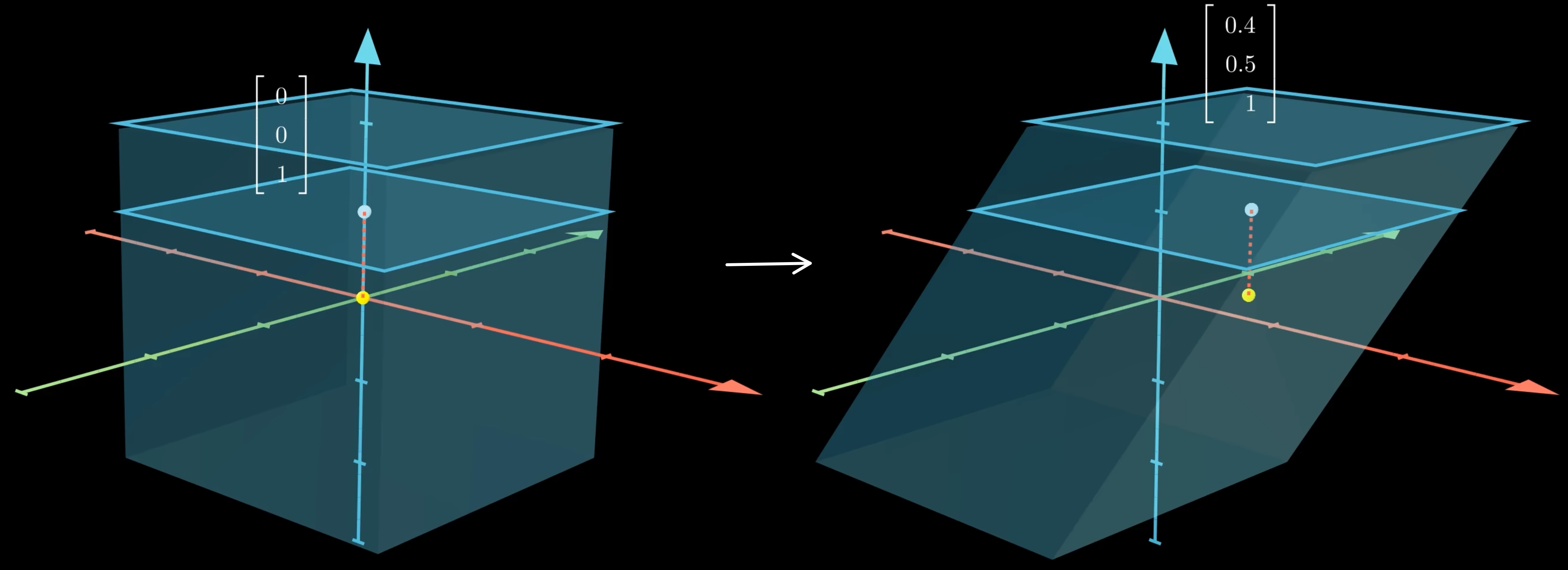
白点
即 点的位置 黄点
白点在 处的二维平面上的映射 蓝色立方体区
这个这个立方体可以想象为所有 Coordinates,即所有 点之集合 可以抽象化表达为
,并非一定要使 白点所在的蓝色平面
这个平面可以想象为所有符合二维平移运动之要求的 Coordinates,即所有 的 点之集合 可以抽象化表达为
如何解释图中的形变?
图中形变是一种透视投影 (see 5)
可以发现,蓝色立方体区因为齐次变换而整体发生了形变,可以把之前设定的
换成任何一个蓝色立方体区域内的坐标,然后与齐次变换矩阵 相乘即可验证 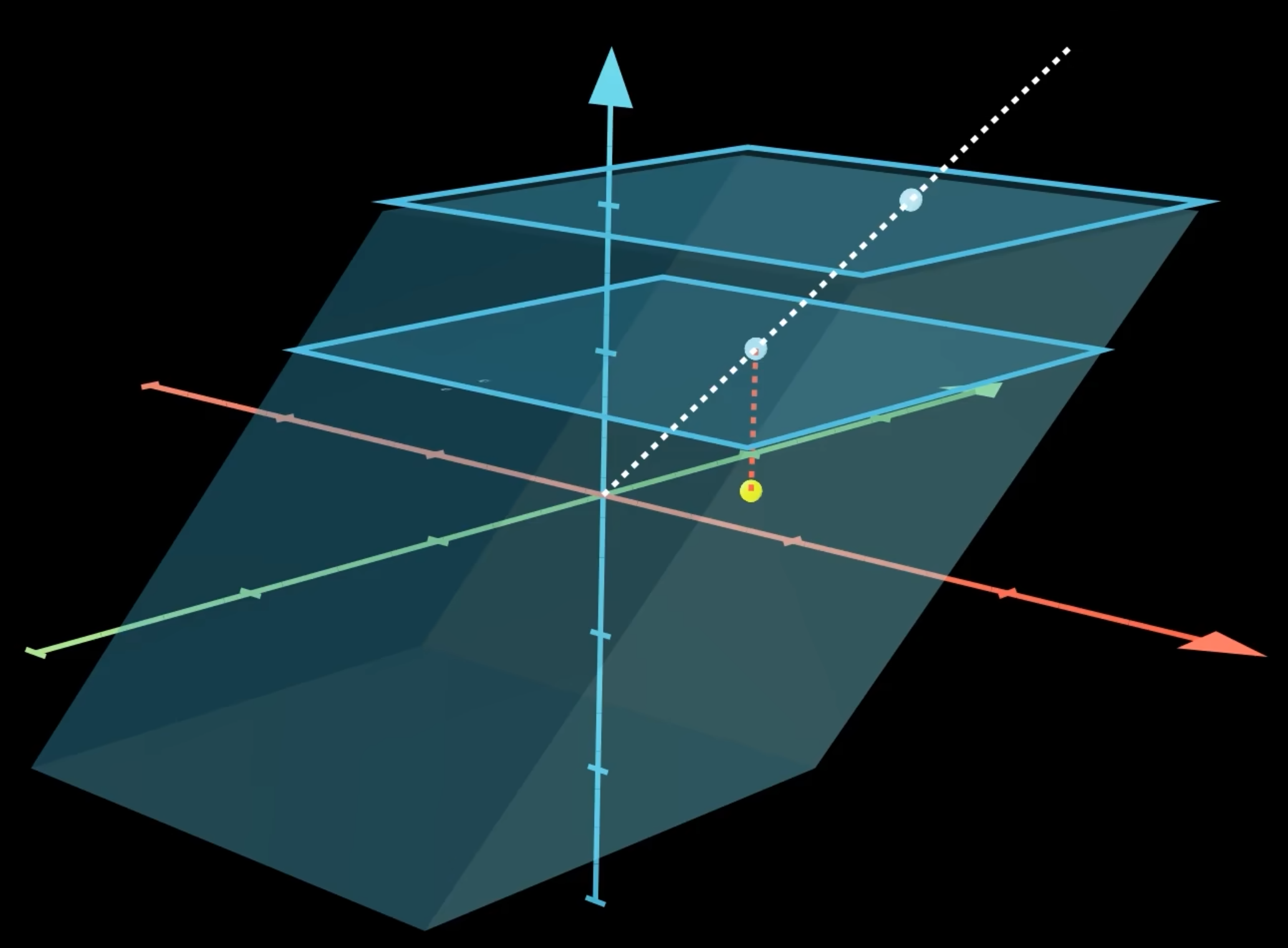
上图中,白色虚线表示的是形变后的原来在
轴上的点 若用
表示一个点在 轴上的坐标,那么所有 轴上的点可以表示为 而这条线的形变过程则可以表示为
所描述的平面被称为归一化平面,即上图中从下往上起第一个蓝色平面
4. Pinhole Camera Model
首先设定固定不动的 Global Frame
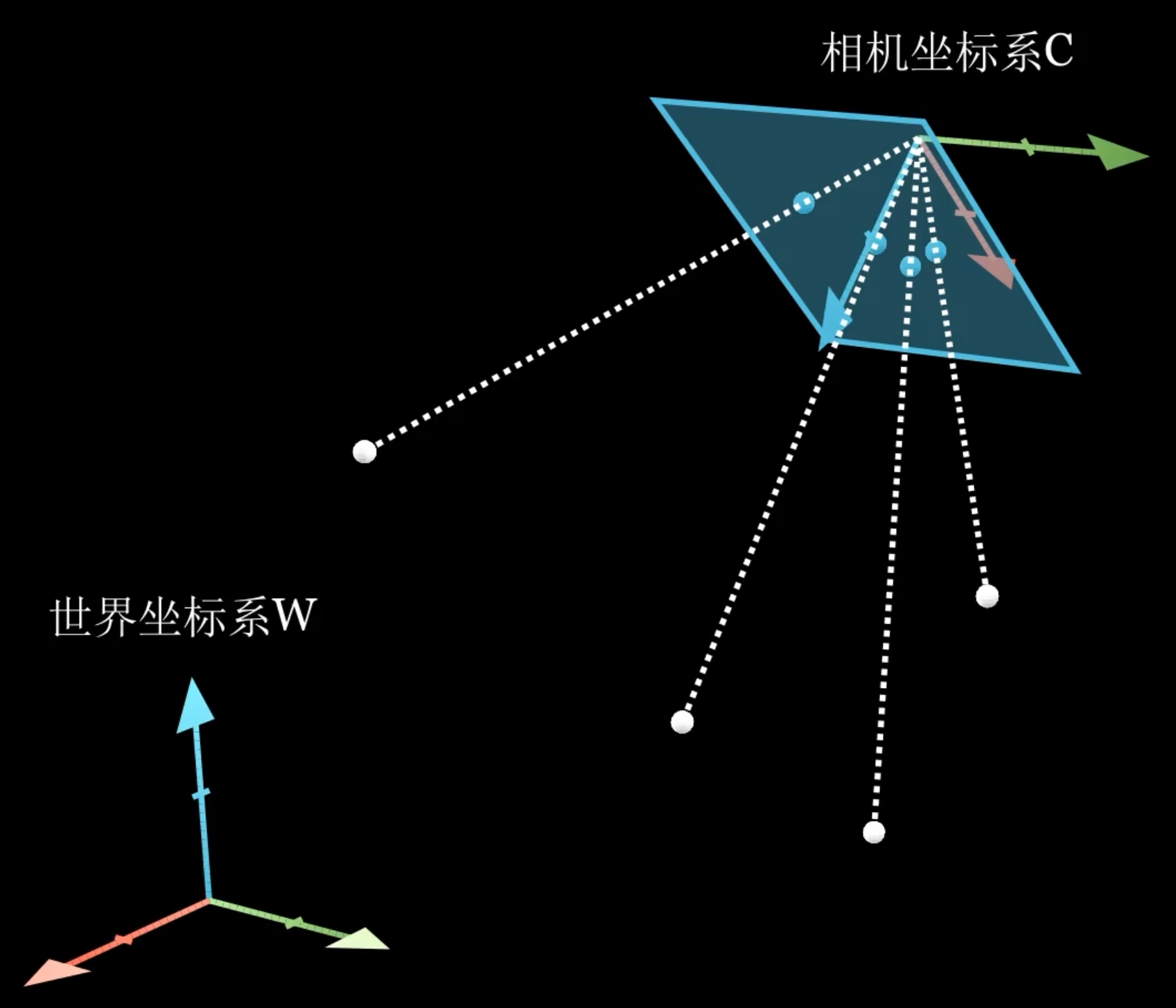
上图中的一些元素
- 白点
世界坐标系下的物体坐标点 - 蓝色平面
Image Plane 相机成像平面 - 蓝点
白点在相机成像平面上的投影
描述这个投影过程需要解决如下的问题
Coordinates Conversion from
解决方案:Extrinsic Matrix 相机外参矩阵
Coordinates Projection from
解决方案:Intrinsic Matrix 相机内参矩阵
4.1 Extrinsic Matrix 外参矩阵
Extrinsic Matrix 外参矩阵的功能是将物体在 Global Frame 中的坐标转换到 Camera Frame 中,是 3D 空间的坐标转换
可以直接把 3.3 - 使用说明 1. 中的公式拿来用,只需要把
Coordinates of in Position of in Position of point in Position of point in
where
Degrees of Freedom
好消息,我们的世界中三个维度
是完全正交的,因此 ,哪怕它实际有9个参数,实际上也只有 3 DOF 外参矩阵 Extrinsic Matrix 一共有 6 个自由度
4.2 Intrinsic Matrix 内参矩阵
Problem Statement
通过 4.1 的 Extrinsic Matrix
,我们可以把物体的位置从世界坐标下转换到相机坐标下 内参矩阵会解决从相机坐标到Image Plane 像平面 的投射问题
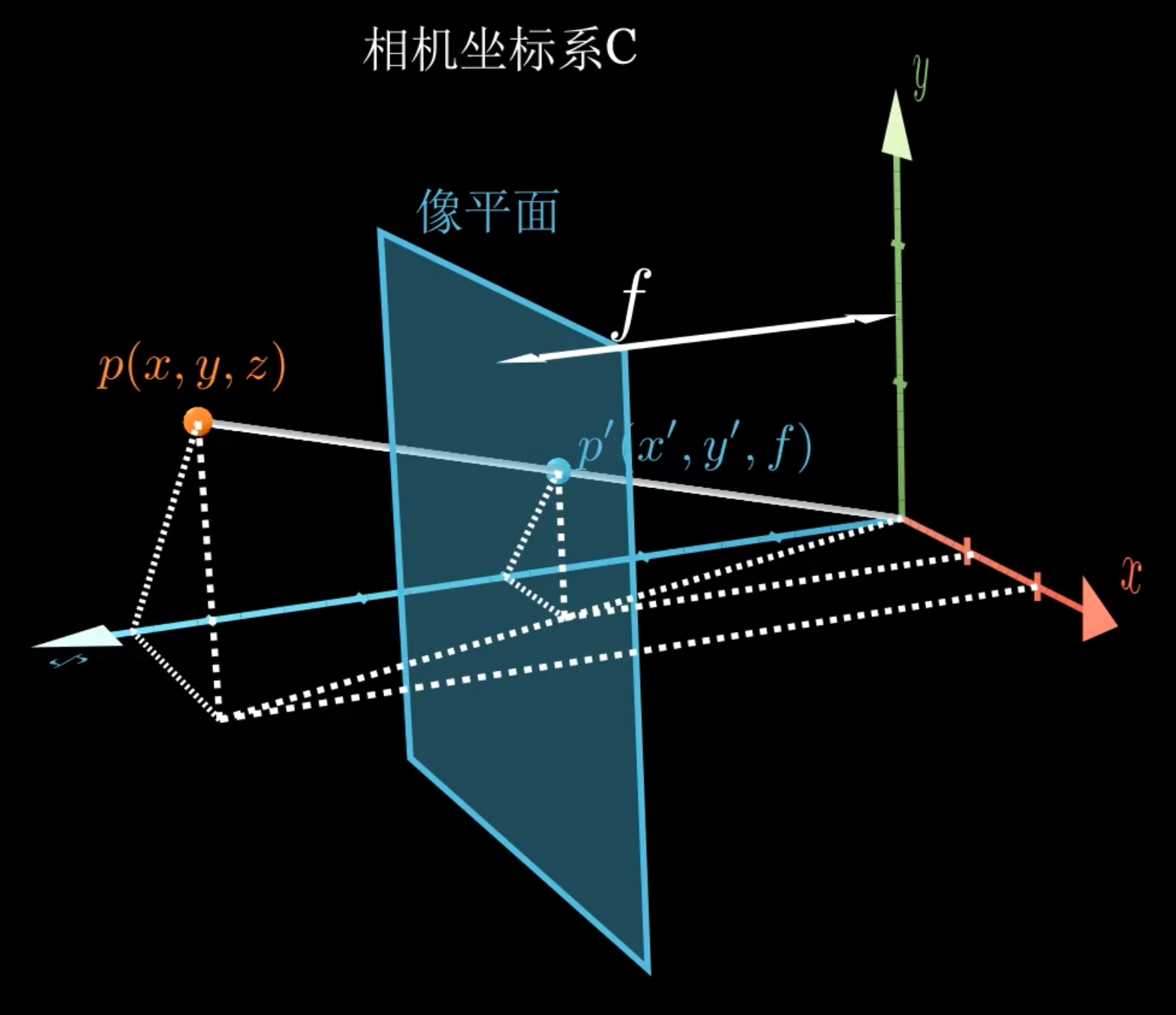
- 红点
物体在相机坐标系中的位置 - 蓝点
物体在蓝色平面,即 Image Plane 像平面上上的投影点 - 蓝色平面
Image Plane 成像平面 焦距 主光轴 Optical Axis,与 Image Plane 的交点称 Principal Point
- 红点
Image Plane Problems
以下所有问题均可甩锅给生产工艺
Principal Point 正好在 Image Plane 的中心,即
实际上:有 偏移 Offset
每个 Image Plane 的
与 的比例是正常的 实际上:有 缩放 Scaling
每个 Image Plane 的
与 轴是完美正交的 实际上:有 偏斜 Skew
Offset 和 Scaling 可以在获得投影点坐标的时候就解决问题 (see 4.2.1),Skew会更复杂 (see 4.2.2)
4.2.1 如何获得投影点坐标
上图中,
考虑主光轴偏移,则投影点在 Image Plane 上的坐标
等式右边转化为用 matrix 表达
然后 get rid of
从 3D 到 2D 的 Dimension Loss 就发生于此
然后就会得到
最后一步,采集到的图像后需要数字化 Digitization / Pixelization,同时解决 像平面缩放
Assume
4.2.2 Skewed Image Plane
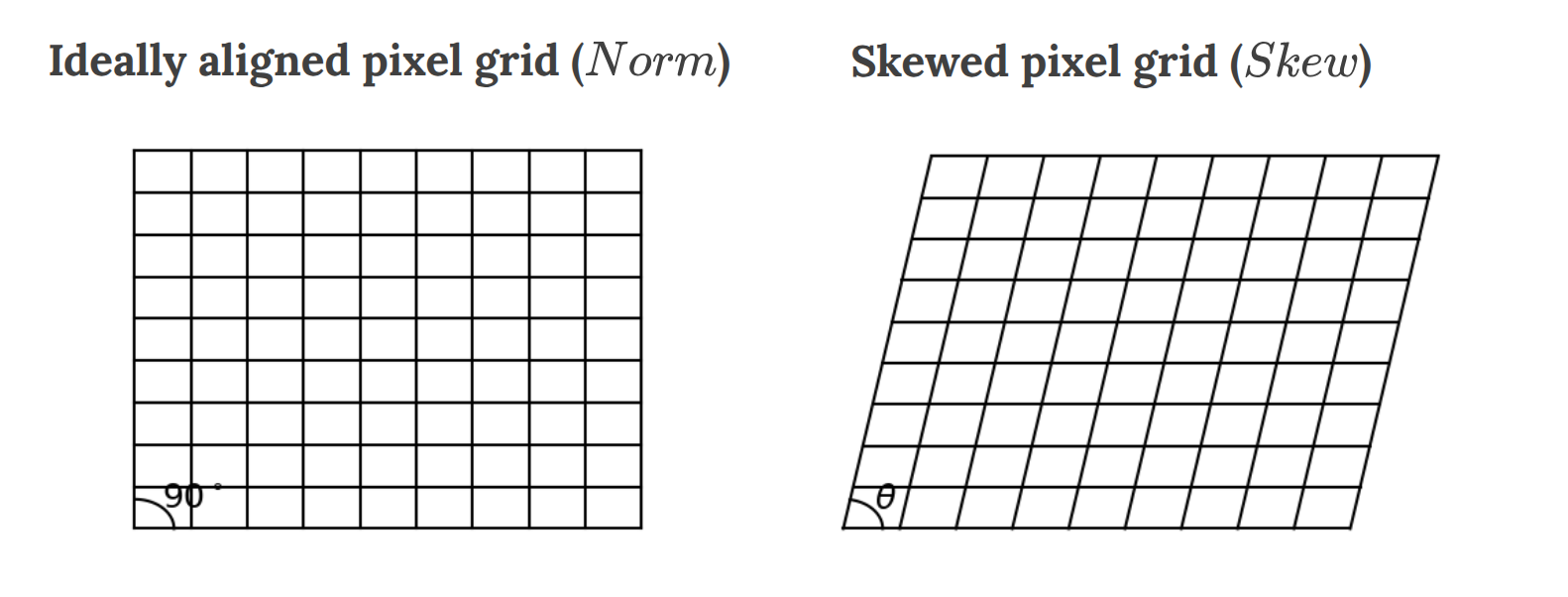
从相机镜头投到 Image Plane 的图像是以左侧的,但是为了让 Image Plane 能正确接收,我们需要把图像变换到右侧
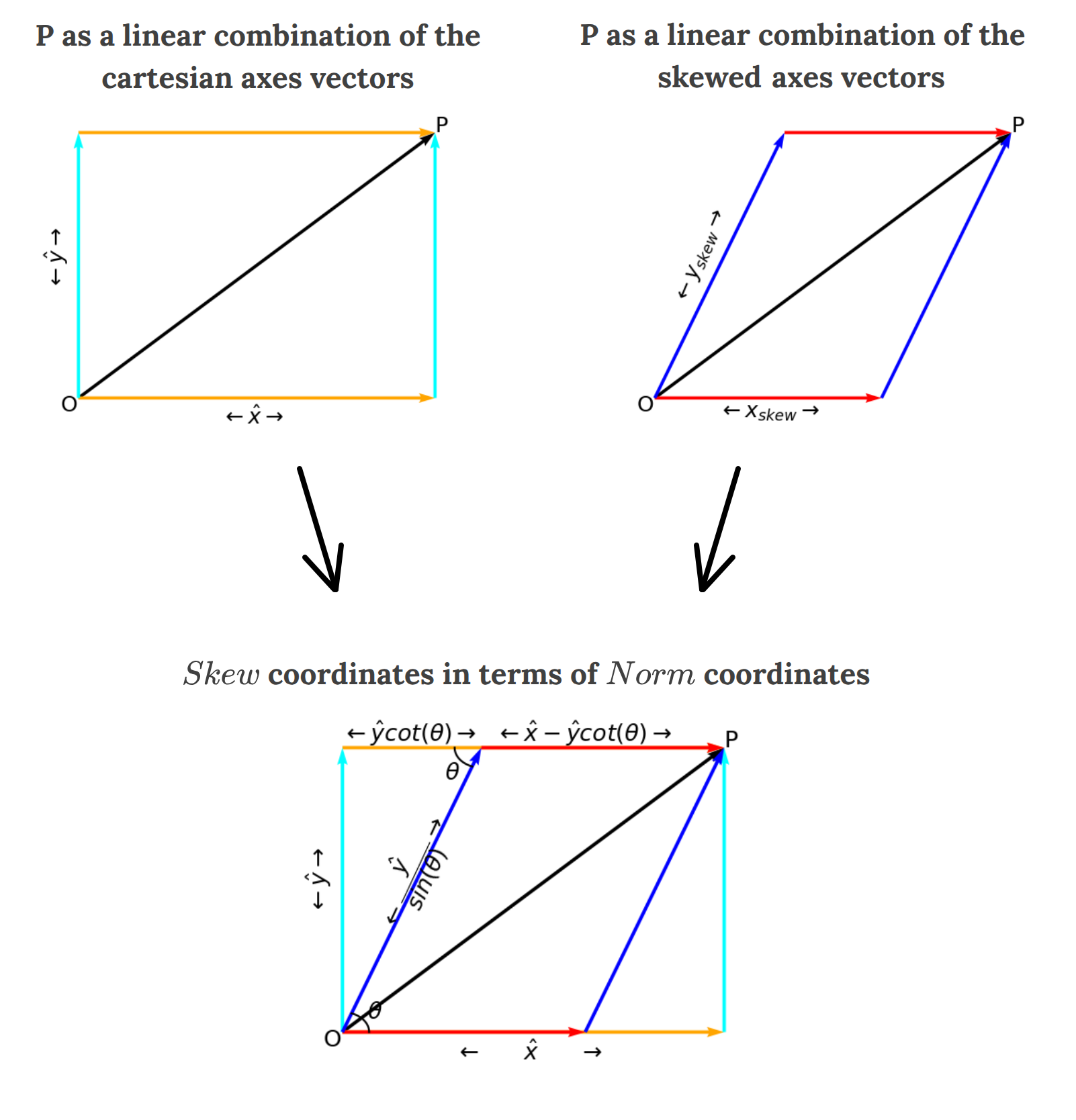
从上图可得到如下坐标变换公式
把从 4.2.1 中得到的结论从 Matrix Form 变成 Equation Form,然后代入上式
4.2.3 Summary
Pixelized Matrix Form
Pixelized Matrix Form, Normalized
Pixelized Equation Form
And
Degrees of Freedom
5 个参数,内参矩阵 Intrinsic Matrix 一共有 5 个自由度
4.3 Lens Distortion 透镜畸变
相机肯定不止是小孔(光圈),它也有透镜(镜头),而透镜通常会导致图像变形...然后你的坐标就不对了
好消息是,我们只需要在算投影点坐标前增加一步 Anti-Distortion 就好了
坏消息是,不是一般的麻烦...
Lens Distortion 大部分是 Radial Distortion,少部分是 Tangential Distortion
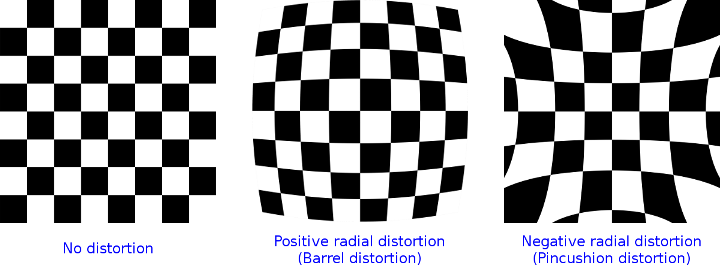
OpenCV 提供的解决方案是用一种长得非常离谱的...系数...
where
are Radial Distortion Coefficients, and typically Higher-Order Coefficients are not considered in OpenCV
Barrel Distortion Pincushion Distortion
投影点坐标可以用如下的方式计算
- 算齐次坐标
- 抗畸变(4.2.1 里没有这一步)
- 算投影点坐标
和之前的定义稍微有点区别,方便起见,我们会把 移后面去
4.4 Model Summary
通用写法
已知 Global Frame
下物体坐标 ,求 Camera Frame 下投影点坐标的流程为 然后 get rid of
,留下 就完成了 Dimension 能对上的写法
上面的那种 Dimension 没法直接对上,所以此处把 Extrinsic Matrix 的最后一层削了,让它变成 Euclidean Rigid Transformation
然后就能写成略丑但 Dimension Match 的版本了
Degrees of Freedom
相机矩阵 Camera Matrix 一共 11 个自由度
5. Camera Calibration
以找 Intrinsic Matrix 为目的的 Checkerboard Calibration
以找 Extrinic Matrix 为目的的 Perspective-n-Point Problem
5.1 Checkerboard Calibration
Camera Intrinsics are generally static,校准只需要一次即可
除非经历长途运送或者受到了很大的冲击,不然不会轻易改变
棋盘格是很好的判断成像形变的参照物,checkerboard calibration 是非常通用的校准方法
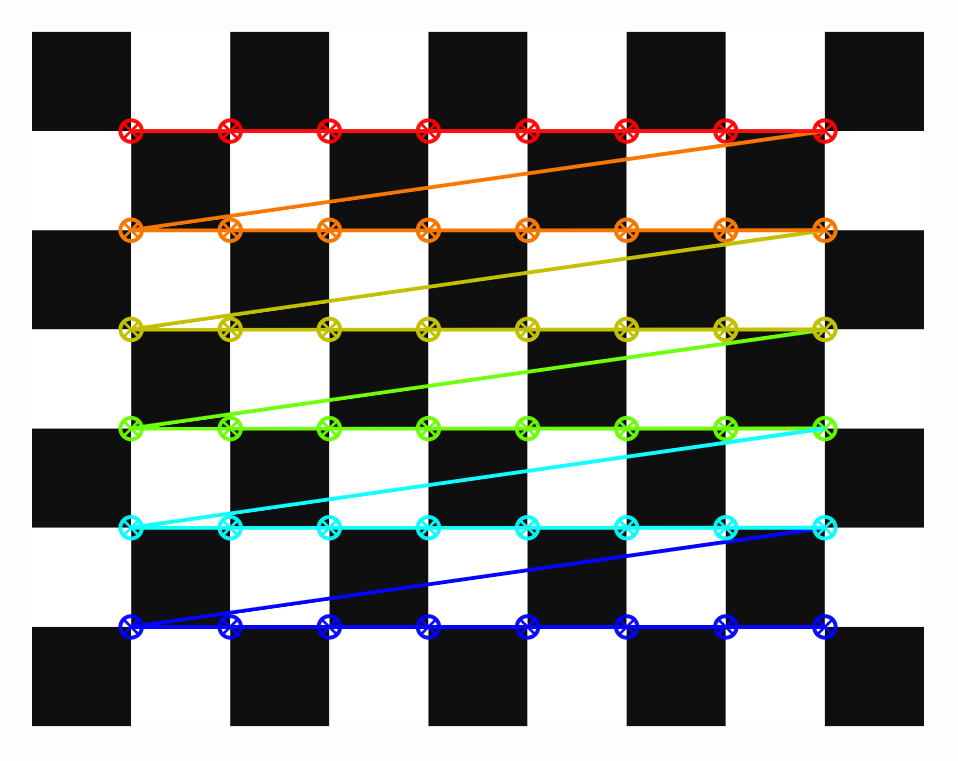
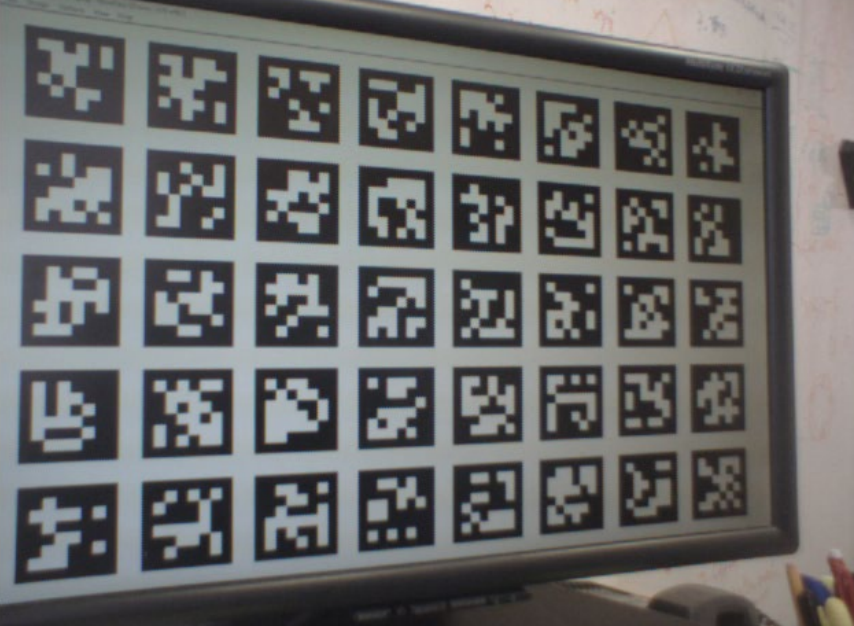
如果你会用 AprilTag 这类标记符号,也可以用下图的 AprilTag 棋盘,反正不管哪种都有一对 Libraries 能用
5.2 PnP Problem
PnP = Perspective-n-Point
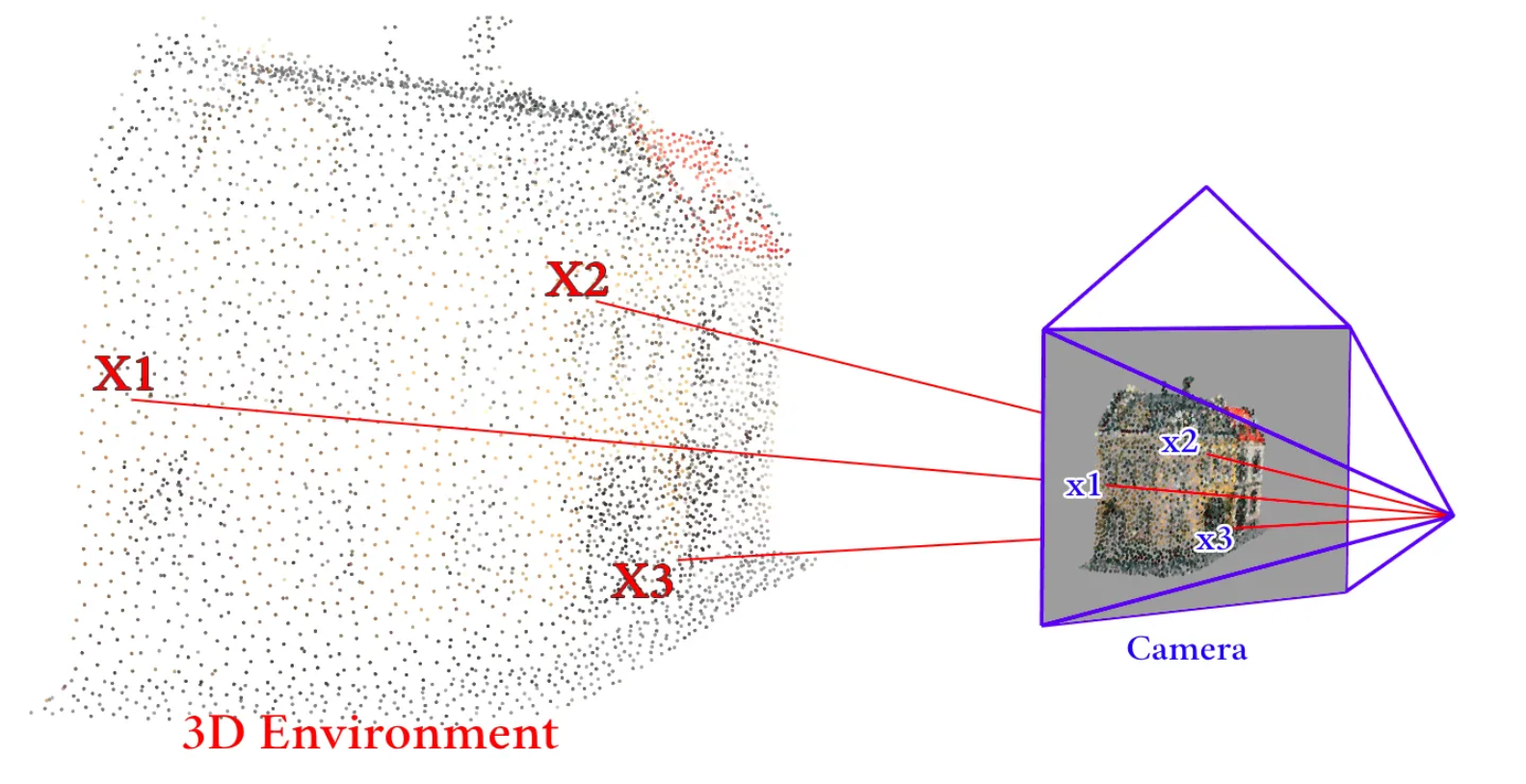
Given
相机内参 组三维空间中的点 映射到相机 Image Plane 上的坐标 对应点一般至少要给 3 组
Find
相机外参,即相机姿态 where
and 应用场景
- Augmented Reality (AR)
- Structure from Motion (SfM)
- ... ...